
In 2025, silence has become a feature—not just a luxury—for those who spend hours at their desks.
Whether you’re typing reports, analyzing spreadsheets, managing creative workflows, or attending back-to-back virtual meetings, ambient PC noise is a constant distraction that wears down productivity over time.
Passive cooling has evolved into a reliable and even elegant solution for quiet computing, especially in office environments where workloads are typically light to moderate.
In this guide, we’ll explore how passive cooling works, the best fanless CPU coolers, cases, and power supplies in 2025, and how to put together a fully passive, high-efficiency PC that keeps your work silent and smooth.
What Is Passive Cooling?
Passive cooling is a system that relies on heat dissipation without any mechanical airflow—meaning no fans, no moving parts, and no sound. Instead, it uses large heatsinks, heatpipes, and natural convection to move heat away from the CPU or GPU and out of the case.
The result is a completely silent computing experience. No hums, no whirs, no vibrations—just uninterrupted focus.
Why Choose Passive Cooling for Office PCs?
Office PCs are typically used for tasks that don’t generate heavy loads:
Email, browser work, word processing
Video conferencing and remote collaboration
Coding, scripting, and light software development
Media playback, light editing, and design
These tasks don’t push modern hardware to its limits, making passive cooling a practical choice.
Key Benefits:
Zero noise output
No fan maintenance or dust clogging
Lower power consumption
Longer component lifespan (due to no moving parts)
Elegant, minimalist builds that suit modern workspaces
What Makes Passive Cooling Viable in 2025?
Thanks to advancements in chip efficiency, modern CPUs and GPUs generate less heat per watt. For example:
AMD’s Ryzen 8000 series APUs with Radeon 780M
Intel’s Ultra 5 and 7 processors with Arc graphics
Low-TDP chips under 65W that run cool at idle
Motherboards with enhanced VRM efficiency
NVMe SSDs that produce minimal thermal output
Combined with high-performance thermal materials and passive-optimized cases, you can build a fully fanless system that stays cool under standard office use.
Best CPUs for Passive Office PCs
AMD Ryzen 7 8700G
8 cores, Radeon 780M integrated graphics
65W TDP, efficient idle draw
Perfect balance between silence and power
Excellent for multitasking and productivity tools
AMD Ryzen 5 5600G
6 cores, Vega iGPU
Still competitive in 2025 for basic office use
Easily cooled with passive solutions
Intel Core Ultra 5 125H
Energy-efficient hybrid architecture
Integrated Arc graphics
Very low idle power
Great for multi-monitor setups and browser-heavy tasks
Intel Core i3-14100T
4 cores, 35W TDP
Excellent for light workflows
Extremely low heat generation
Note: Avoid unlocked or high-TDP CPUs like Ryzen “X” or Intel “K” models unless you plan to use semi-passive or hybrid setups.
Best Passive CPU Coolers in 2025
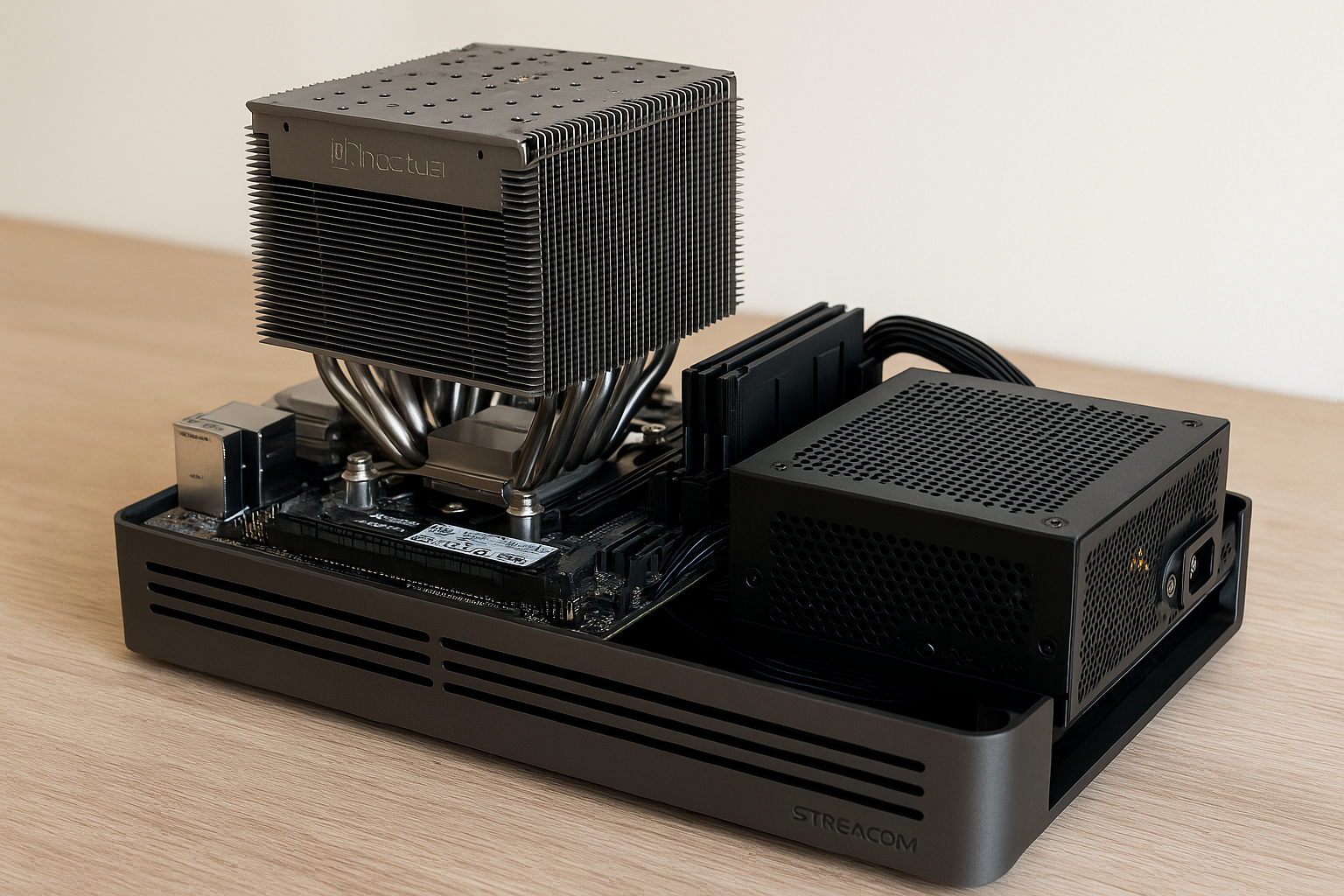
Noctua NH-P1
The gold standard of passive air cooling
Massive heatsink with fin density designed for no-fan use
Compatible with most modern sockets (AM5, LGA 1700)
May require a well-ventilated case or mesh layout
Optional fan bracket included (for hybrid builds)
Thermalright HR-22 Plus Passive
Reintroduced with upgrades in 2025
Ideal for APUs and low-wattage CPUs
Wider fin spacing for better convection
Mounts securely with minimal pressure on the socket
Arctic Alpine 23 Passive
Compact, aluminum-only heatsink
Perfect for 35–45W CPUs
Silent and effective for web/email/light document use
Budget-friendly option for entry builds
Streacom ST-LPFC Passive Cooler
Low-profile, integrated with Streacom cases
Passes heat directly to the case chassis
Ideal for ultra-compact and stylish silent PCs
Best with Ryzen APUs or Intel Ultra processors
Fanless PC Cases Built for Passive Cooling
Streacom DA2 V2
Modular internal layout for airflow optimization
Aluminum body acts as heat sink
Fanless PSU support
Ideal for clean desk setups and fanless perfectionists
Akasa Maxwell Pro
Slimline HTPC-style fanless chassis
Includes passive heatpipes that contact CPU directly
Designed for low-profile, horizontal layouts
Great for media setups or under-monitor configurations
HDPLEX H1 V3
All-aluminum case with external heatsink panels
Supports passive GPU and CPU builds
Very compact and premium look
Requires custom layout planning but offers true zero-noise performance
SilverStone VT01
Budget-friendly case with vertical convection design
Compatible with passive heatsinks and fanless PSUs
Simple steel design for silent workstations
Easy access for maintenance or upgrades
Best Fanless Power Supplies
Seasonic Prime Fanless TX-500
80+ Titanium certified
Fully passive and completely silent
Exceptional voltage regulation
Ideal for office loads under 300W
HDPLEX 500W GaN PSU
High-efficiency Gallium Nitride power conversion
Compact and passively cooled
Works with both ATX and SFX cases
Pair with external power bricks or internal AC-to-DC modules
SilverStone Nightjar NJ450-SXL
450W, SFX-L size
Fully modular, 0 dB operation
Excellent for Mini ITX silent builds
Long lifespan with stable rails
Motherboard Considerations
Look for:
Solid VRM heatsinks (passive cooling works better with low-heat motherboards)
Low-profile M.2 heatsinks
Fanless chipset (some boards still have tiny fans—avoid them)
Smart BIOS fan controls for hybrid cases
Dual NVMe slots for all-solid-state storage
Avoid boards with onboard chipset fans or limited VRM cooling.
Fanless Storage and Graphics
All-passive systems must avoid:
Mechanical hard drives
Noisy or actively cooled GPUs
Excessively high-speed NVMe SSDs that overheat without airflow
Instead, choose:
WD SN770, Crucial P3 Plus, or Samsung 980 NVMe drives (cooler running SSDs)
Integrated GPUs (Radeon 780M or Intel Arc)
If using a discrete GPU:
ASUS RTX 4060 Passive Edition
Palit GTX 1650 KalmX
Sapphire RX 6400 Silent Edition
System Layout Tips for Passive Cooling
Orient the case vertically whenever possible
Place exhaust vents at the top to aid convection
Keep cables out of airflow paths
Use thermal pads between SSDs and case walls to aid dissipation
Apply high-end thermal paste like Kryonaut or Arctic MX-6
Undervolt CPU and GPU to reduce power and thermal output
Elevate the case slightly to improve under-case airflow
Performance Expectations
A fully passive office PC built with a Ryzen 7 8700G or Intel Ultra 5 chip can easily handle:
Dozens of Chrome tabs
1080p and 1440p video playback
Light photo and design work
Office apps and Zoom calls
Coding in Visual Studio Code or PyCharm
Dual-monitor productivity setups
Typical temps:
Idle: 35–45°C
Light load: 50–60°C
Peak load: 70–80°C (acceptable for passive systems)
Hybrid Passive Builds: The Silent Compromise
If you need more power, consider a hybrid setup:
Passive CPU cooler
Single silent case fan at 600 RPM
Semi-passive GPU (fans off under 50°C)
PSU with 0 RPM mode until 300W
These builds stay silent under normal use and only activate minimal airflow under high loads.
Recommended case fans:
Noctua NF-A12x25 ULN
Arctic P12 Silent
be quiet! Pure Wings 2 120mm
Set them in BIOS to ramp up slowly above 60°C for optimal silence.
Real-World Fanless Build Example
Use Case: Office productivity, dual monitor, occasional Photoshop
Case: Streacom DA2 V2
CPU: AMD Ryzen 7 8700G
Cooler: Noctua NH-P1
Motherboard: ASUS B650I Wi-Fi
Storage: 1TB WD SN770 NVMe
PSU: Seasonic Prime Fanless 500W
Noise: 0 dBA at all times
Thermals: 40°C idle, 75°C load
Performance: Smooth, silent, reliable
Maintenance and Longevity
Fanless PCs require minimal maintenance:
Dustless interior (no fans = no intake)
Fewer failure points (no bearings to wear out)
No need to replace thermal paste frequently
Silent even years after build date
Just clean vents periodically and monitor temperatures during extreme heat.
Final Thoughts
Passive cooling in 2025 isn’t just a novelty—it’s a viable, reliable, and surprisingly elegant option for office PCs. With the right components and layout, you can enjoy true silence without sacrificing performance.
Whether you’re seeking deep concentration, attending sensitive meetings, or simply want your PC to disappear into the background, fanless technology delivers.
In an age where work and tech intersect more than ever, peace and productivity go hand in hand. Passive cooling brings both—quietly and effectively.

Chris Dalton is a tech enthusiast with a passion for helping others build high-performance PCs on a budget. He shares practical advice, in-depth guides, and honest insights to empower freelancers, gamers, and creators to get the most out of their hardware. With hands-on experience and a focus on smart, affordable solutions, Carlos Eduardo turns complex tech into accessible knowledge for all.