
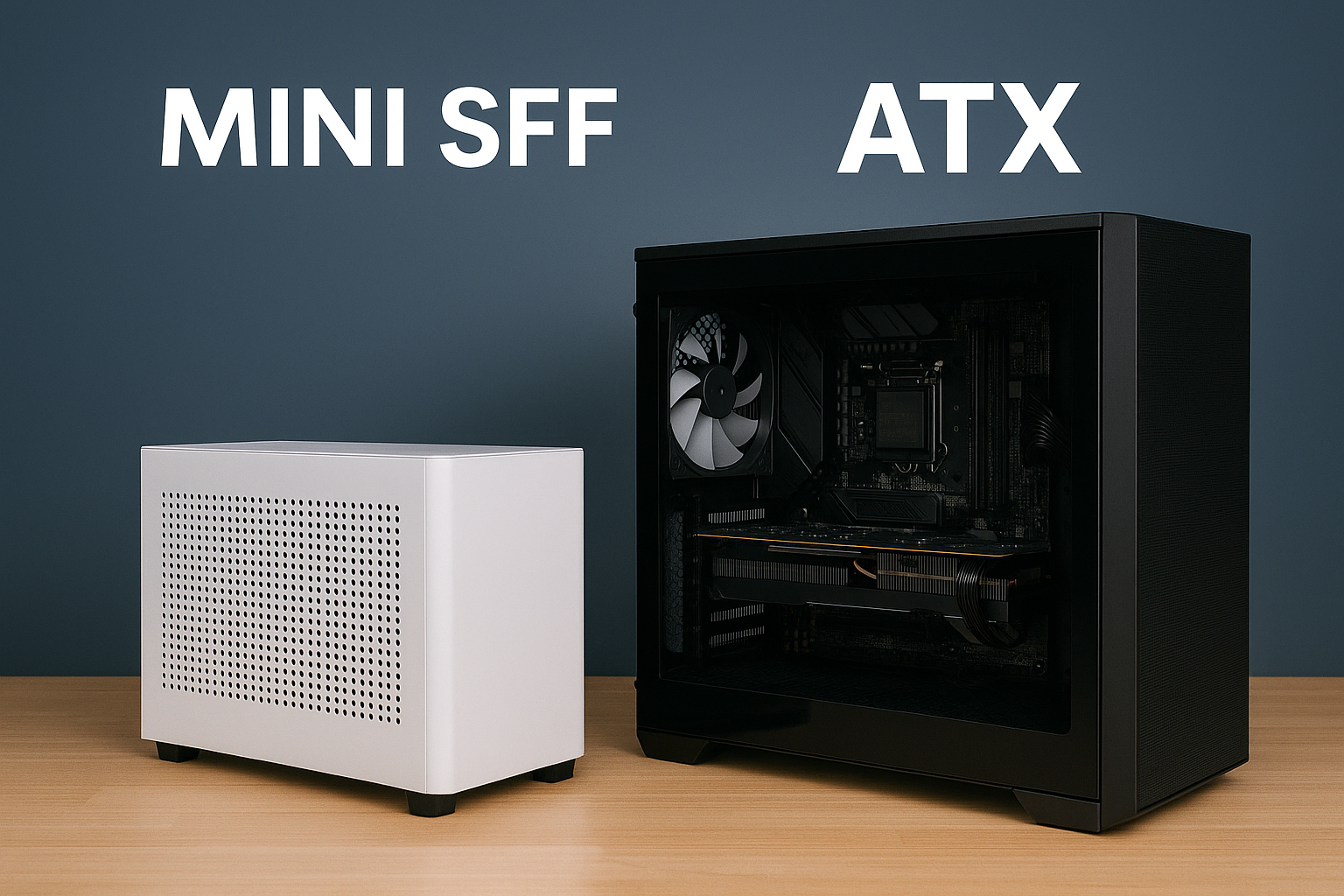
If you’re planning a new PC build in 2025, you’ve probably come across the debate between Mini SFF (Small Form Factor) and traditional ATX builds.
Both formats have passionate supporters—and for good reason. They each serve different needs, lifestyles, and performance expectations.
But with Mini SFF systems becoming more capable than ever, many builders are now asking a serious question: should I go small?
This guide compares Mini SFF and ATX builds across performance, space, thermals, upgradeability, aesthetics, and cost. By the end, you’ll have a clear understanding of which form factor best suits your specific goals.
What Is a Mini SFF Build?
A Mini SFF build is a compact desktop computer that typically uses Mini-ITX motherboards and cases with internal volumes ranging from 5 to 20 liters. These systems are engineered to deliver full desktop-class performance in the smallest physical footprint possible.
Mini SFF is ideal for those who value desk space, portability, aesthetics, or a minimalist setup. Common users include gamers, streamers, professionals working from home, and anyone who dislikes the bulk of traditional towers.
What Is an ATX Build?
An ATX build is a standard-size desktop computer using an ATX motherboard, which measures 305mm x 244mm. These systems usually reside in mid-tower or full-tower cases with volumes ranging from 30 to 70 liters or more.
ATX builds are known for expandability, ease of building, better airflow, and the ability to host more drives, cards, and cooling hardware. They are ideal for high-performance gaming, workstation tasks, and long-term upgrade plans.
Size and Space: How Much Room Do You Have?
One of the most obvious differences is physical size.
Mini SFF
Volume: 5–20L
Footprint: Fits easily on desks, under monitors, or entertainment centers
Portability: Can be moved or packed in a backpack
Perfect for small apartments, dorm rooms, or minimalist setups
ATX
Volume: 30–70L
Requires a dedicated desk or floor space
Heavy and bulky, especially with large GPUs or coolers
Not ideal for tight workspaces or mobile use
Verdict: Mini SFF wins for portability and tight spaces.
Building Difficulty and Cable Management
Mini SFF
Tighter tolerances and limited space
Requires planning ahead: installing RAM, cooler, and cables in the right order
Challenging for first-time builders
Cable management can be difficult without custom cables
Often requires SFX power supplies and low-profile coolers
ATX
Spacious interior makes installation easier
Plenty of room for hands, tools, and airflow
Simpler cable routing with hidden compartments
More forgiving for beginners
Verdict: ATX wins for ease of building and maintenance.
Cooling and Thermals
Mini SFF
Smaller airflow pathways require careful cooling strategies
Relies on efficient components and smart fan curves
Often limited to 240mm AIOs or low-profile air coolers
Can get hot under sustained loads without proper tuning
ATX
Room for large tower coolers, 360mm AIOs, and additional case fans
Better airflow leads to lower temperatures
Allows for better thermal headroom and overclocking
Ideal for high-TDP CPUs and GPUs
Verdict: ATX wins for thermal performance and overclocking headroom.
Performance Potential
Performance depends on component selection—not form factor. However, there are some practical limitations.
Mini SFF
Supports powerful CPUs and GPUs if thermals are managed well
Best suited for up to RTX 4070/4070 Ti or RX 7800 XT (in smaller cases)
Limited to ITX motherboards with fewer VRMs or RAM slots
APUs can eliminate GPU space for truly tiny builds
More compact, quieter, and power-efficient options now exist
ATX
Supports all CPUs and GPUs without concern for size or thermals
Better VRMs and RAM support (4 slots vs. 2 in ITX)
More PCIe slots for capture cards, storage cards, or add-ons
More power-hungry, but often higher peak performance
Verdict: Tie. Both formats can offer outstanding performance if built correctly, but ATX is better for extreme builds.
GPU Compatibility
Mini SFF
Must carefully choose GPU based on length, height, and thickness
Many cases max out at 2.5 slots or under 300mm in length
Compact GPUs are available and very capable (RTX 4060/4070, RX 7600)
Thermals must be considered to avoid fan ramp-up
ATX
Fits any GPU on the market, including 3.5-slot RTX 4090 cards
Better spacing prevents heat buildup
Fewer restrictions when choosing aftermarket coolers
Verdict: ATX offers more freedom for GPU selection, especially for high-end builds.
Upgradeability
Mini SFF
Limited to one PCIe slot (ITX boards)
Usually 2 RAM slots, 1–2 M.2 drives
Compact cases may limit future GPU upgrades
Less modularity
ATX
Multiple PCIe slots
Support for 4 RAM modules and multiple M.2 + SATA drives
Easy to swap GPUs, PSUs, and coolers
Ideal for multi-year upgrade paths
Verdict: ATX is far superior for upgrade flexibility.
Cost Comparison
Contrary to expectations, Mini SFF builds are often more expensive due to specialized parts.
Mini SFF Cost Factors
Mini-ITX motherboards usually cost more than ATX variants
SFX power supplies are more expensive per watt
Cases are niche and often use premium materials (aluminum, mesh, custom risers)
Tighter cooling requirements may need more expensive fans or AIOs
ATX Cost Factors
More affordable options at every price point
Wider range of motherboards and cases
Standard-size PSUs and components reduce overall cost
Better value for high-performance builds
Verdict: ATX offers better performance-per-dollar. Mini SFF costs more for the same performance.
Aesthetics and Design
Mini SFF
Sleek, minimalist, and modern
Looks great on a desk or TV stand
Portable and unobtrusive
Often matches premium design language (Apple, gaming consoles)
ATX
Custom lighting, tempered glass, and RGB fans look impressive
More space for customization and visual personality
Can dominate your space if poorly managed
Verdict: Subjective, but Mini SFF often appeals more to minimalist users.
Portability and Flexibility
Mini SFF PCs can be used in places where ATX towers cannot.
Use cases:
Living room gaming with a controller
On-the-go creative work
Shared apartments or bedrooms
Temporary workstations or studio setups
Consoles for LAN parties or travel
Verdict: Mini SFF wins decisively for flexibility and portability.
Who Should Choose Mini SFF?
You want a clean desk or minimalist setup
You have limited space or share a room
You prioritize aesthetics and silence
You plan to game or work at 1080p–1440p
You prefer efficient, quiet builds over raw power
You’re comfortable with limited upgrade paths
You enjoy unique, custom building challenges
Who Should Choose ATX?
You want maximum performance with no space restrictions
You plan to do 4K or high-refresh-rate gaming
You use your PC for creative workloads like 3D rendering, video editing, or streaming
You plan to upgrade over 3–5 years
You want a simple build experience
You value thermal performance and airflow over size
Final Verdict: Which One Is Right for You?
There’s no universal winner between Mini SFF and ATX—only the format that best matches your use case.
Choose Mini SFF if you value space-saving design, clean aesthetics, portability, and silence. It’s perfect for modern living and highly capable of performance gaming when carefully configured.
Choose ATX if you need raw power, thermal headroom, upgrade options, and a more forgiving building experience. It’s ideal for long-term investment or enthusiast-level performance.
In 2025, Mini SFF PCs are no longer a compromise—they’re a choice. And a great one at that.

Chris Dalton is a tech enthusiast with a passion for helping others build high-performance PCs on a budget. He shares practical advice, in-depth guides, and honest insights to empower freelancers, gamers, and creators to get the most out of their hardware. With hands-on experience and a focus on smart, affordable solutions, Carlos Eduardo turns complex tech into accessible knowledge for all.