
Silence is no longer a luxury in the modern office—it’s a productivity tool.
Whether you’re working from home, in a coworking space, or in a quiet office, a workstation PC that makes little to no noise can have a profound impact on focus, comfort, and overall efficiency.
In 2025, it’s easier than ever to build a high-performance PC that also runs whisper-quiet.
This guide covers the essential components you need to build a truly silent workstation. From fanless power supplies to vibration-free storage and ultra-quiet CPU coolers, we’ll walk you through what to look for, what to avoid, and how to assemble a system that empowers your workflow without creating distraction.
Why Build a Silent Workstation?
For anyone who spends 6 to 10 hours a day on a PC, ambient noise can gradually erode concentration. Silent PCs are especially beneficial for:
Writers and developers
Video editors and designers
Remote workers and online educators
Analysts, marketers, and data professionals
Office workers who take frequent video calls
Content creators with audio-sensitive workflows
Reducing background hum improves cognitive clarity, reduces stress, and creates a more immersive and professional environment.
The Foundation: Choosing the Right Form Factor
Start with your case and motherboard format. These define your size constraints, airflow design, and thermal potential.
Ideal Form Factors for Silent Workstations
Mini ITX – Great for minimal setups or small desks
Micro ATX – Offers expandability and compact design
Mid-Tower ATX – Best for long-term upgradability and thermal headroom
Micro ATX and ATX are typically easier to keep cool quietly, thanks to larger case volume and better airflow routing.
CPU: Power Meets Efficiency
Your processor drives your entire workflow. For silence, choose CPUs with a balance between core count and thermal efficiency.
Best Silent Workstation CPUs in 2025
AMD Ryzen 7 8700G
8 cores, integrated Radeon 780M
65W TDP with low idle temps
No discrete GPU needed
Intel Core Ultra 7 165H
Hybrid-core design (P+E cores)
Arc integrated graphics
Excellent power scaling for quiet systems
AMD Ryzen 9 7900
12 cores, no iGPU
Efficient at idle but needs solid cooling
Best for high-end workloads
Intel i5-14600T
10 cores, 35W TDP
Ideal for quiet productivity builds
Avoid unlocked “K” or “X” series CPUs unless paired with high-end quiet cooling.
CPU Cooling: Silence Starts at the Core
The CPU cooler is the most critical component in a silent build. High-performance coolers at low RPMs or fully passive coolers are ideal.
Best Quiet CPU Coolers
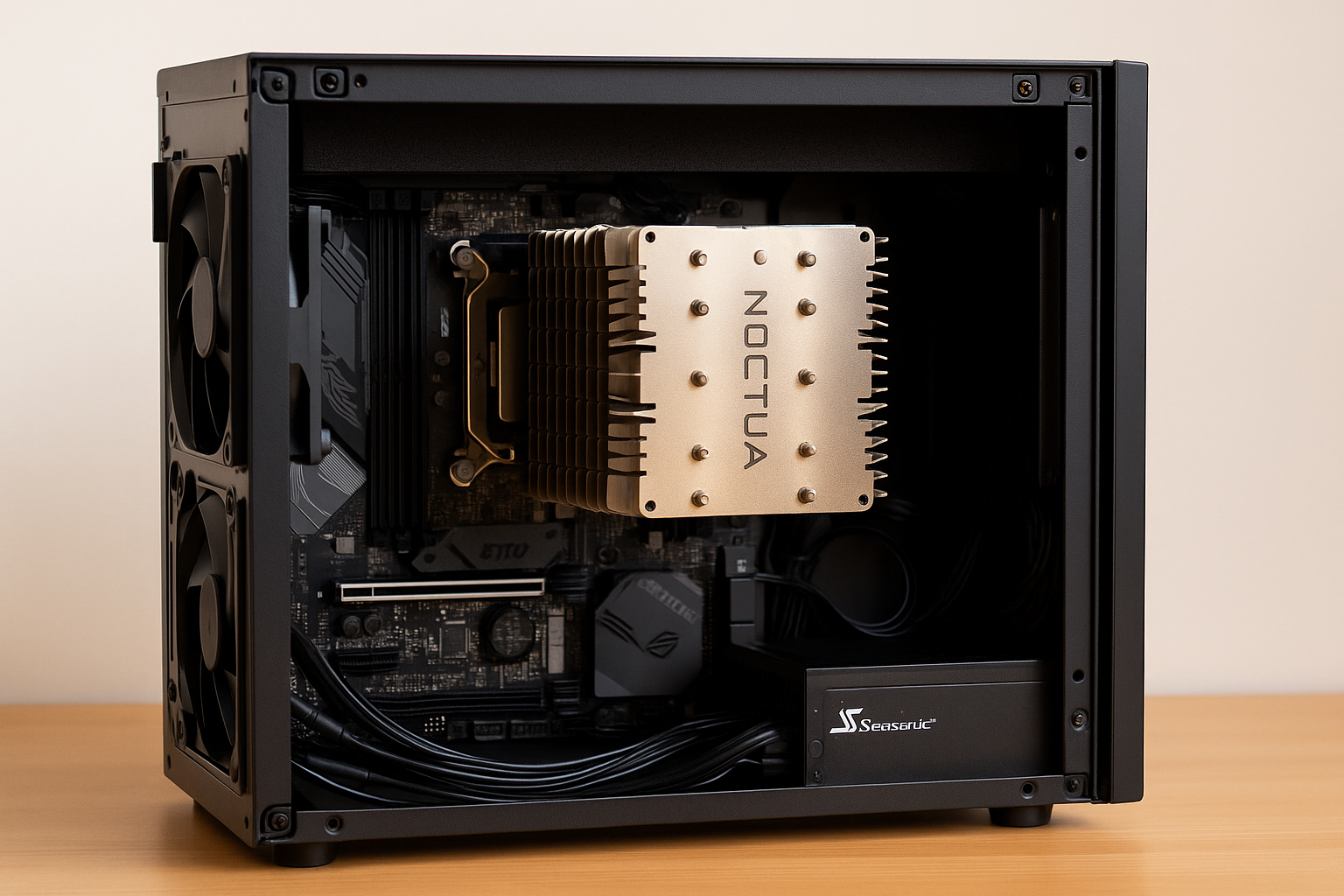
Noctua NH-P1
Fanless, huge heatsink
Ideal for 65W CPUs and well-ventilated cases
be quiet! Dark Rock 5
Silent 120mm fan with efficient fin stack
Virtually inaudible under most loads
Thermalright Peerless Assassin 120 SE
Dual-tower design with low-noise fans
Excellent cooling-to-noise ratio
Scythe Ninja 5
Massive fin stack and ultra-quiet fan
Great for mid-tower cases
Use thermal paste like Arctic MX-6 or Noctua NT-H2 to optimize heat transfer.
Motherboard: Stability and Fan Control
Choose a motherboard that supports fan tuning, passive chipset cooling, and efficient VRMs.
Key Features for Silent Builds
No chipset fan
Q-Fan, Smart Fan, or Fan Stop settings in BIOS
4-pin PWM headers with fan calibration
M.2 cooling plates for SSDs
Onboard Wi-Fi 6E and Bluetooth
Avoid boards with built-in chipset fans or poor power phase design.
RAM: Low Voltage, High Performance
RAM doesn’t make noise—but it impacts power draw and thermal load.
What to Look For
16GB minimum for light productivity, 32GB for creators
DDR5 preferred (efficient and fast)
Low-profile heatspreaders for cooler clearance
Low-voltage kits (1.1V–1.25V)
Reliable brands: Corsair Vengeance LPX, G.Skill Ripjaws S5, Crucial Pro DDR5
Storage: All-Solid State for Absolute Silence
Ditch mechanical drives. Go 100% SSD to eliminate all drive-related noise.
Ideal Storage Configurations
Primary Drive: 1TB Gen 4 NVMe (OS + apps)
Secondary Drive: 2TB Gen 4 NVMe (files + projects)
Recommended SSDs:
Samsung 990 Pro – Best performance, efficient
Crucial P5 Plus – Balanced thermals
WD SN850X – Great for creatives
Kingston KC3000 – Silent and fast
Use thermal pads on M.2 drives to reduce throttling.
GPU: Integrated or Silent Options
For office and creative work that doesn’t involve 3D rendering or gaming, integrated graphics are often enough. If you need a discrete GPU, pick one with semi-passive or fanless cooling.
Best Quiet GPU Choices
Integrated Radeon 780M (8700G) – Handles dual 4K monitors, light editing
Intel Arc iGPU (Core Ultra) – Improved driver support and video decoding
NVIDIA RTX 4060 Low Profile – Fanless under idle, efficient under load
ASUS RTX 4070 Noctua Edition – Incredibly quiet even during rendering
Palit GTX 1650 KalmX – Fanless card for legacy systems
Avoid blower-style GPUs and reference cards without fan control.
Power Supply: Zero Fan Mode Is a Must
A noisy PSU can ruin a silent build. Go with a unit that includes hybrid fanless operation or is fully passive.
Silent PSU Recommendations
Seasonic Prime Fanless TX-500 – Zero noise at all times
Corsair SF750 Platinum – Semi-passive, quiet SFX PSU
be quiet! Straight Power 12 650W – Hybrid fan mode, silent at <50% load
Cooler Master V850 SFX Gold – High power, low fan noise
Fully modular cables help with airflow and organization.
PC Case: The Silent Shell
Your case defines how noise travels (or doesn’t). Choose one with sound-dampening features and optimized airflow paths.
Top Silent Cases
Fractal Define 7 Compact – Foam padding, modular airflow
be quiet! Pure Base 500 – Dampened side panels, optimized fans
Streacom DA2 V2 – Aluminum build, fanless-friendly
Fractal Terra – Compact and premium, supports passive builds
Cooler Master Silencio S600 – Total silence with understated design
If using fans, choose low-RPM Noctua or Arctic models and limit speeds in BIOS.
Monitors and Peripherals: Complete the Experience
Silent peripherals help round out the quiet workspace.
Silent mechanical keyboard (Cherry Silent Reds or Topre switches)
Low-click mouse (Logitech MX Master 3S)
Monitor with built-in speakers (reduces external noise)
Desk mat to dampen vibrations
Monitor arm for clean ergonomics
Noise isn’t just from the PC—it’s from the full desk setup.
Fan Control Software
Use software to ensure fans stay inaudible under normal loads.
FanControl – Custom curves for CPU, GPU, and case fans
BIOS/UEFI – Create profiles for idle and load states
HWInfo – Track temps, fan RPMs, and system metrics
MSI Afterburner – Undervolt GPU to lower temps and noise
Create fan curves that keep RPMs below 800 during normal use.
Example Silent Workstation Build (2025)
Use case: Writing, editing, spreadsheets, streaming, coding
CPU: AMD Ryzen 7 8700G
Cooler: Noctua NH-P1
Motherboard: ASUS B650I ITX
RAM: 32GB DDR5 6000MHz
Storage: 2TB Samsung 990 Pro
GPU: Integrated Radeon 780M
PSU: Seasonic Prime Fanless 500W
Case: Streacom DA2 V2
Noise: 0 dBA idle, <20 dBA under full load
Performance: Instant response, total silence, premium workspace feel
Final Tips for Building Silent Systems
Plan the build in advance—check component compatibility
Use fewer, higher-quality fans rather than more noisy ones
Prioritize airflow direction—front to back or bottom to top
Elevate the case slightly to enhance convection
Undervolt CPU and GPU where possible
Keep cables tidy to minimize obstruction and vibration
Final Thoughts
Building a silent workstation PC in 2025 isn’t just about avoiding noise—it’s about optimizing your environment for deep work, creativity, and well-being.
With efficient components, fanless options, and quiet-first design choices, you can assemble a powerful machine that’s nearly invisible in sound.
Silence your system, and you might be surprised by how much clearer your thinking becomes. The components we’ve covered here aren’t just quiet—they’re designed to support your best work.

Chris Dalton is a tech enthusiast with a passion for helping others build high-performance PCs on a budget. He shares practical advice, in-depth guides, and honest insights to empower freelancers, gamers, and creators to get the most out of their hardware. With hands-on experience and a focus on smart, affordable solutions, Carlos Eduardo turns complex tech into accessible knowledge for all.